







Microsoft 365 Administration: Complete Beginner to Hero Guide
Table of Contents
- What is Microsoft 365?
- What Does a Microsoft 365 Administrator Do?
- Prerequisites
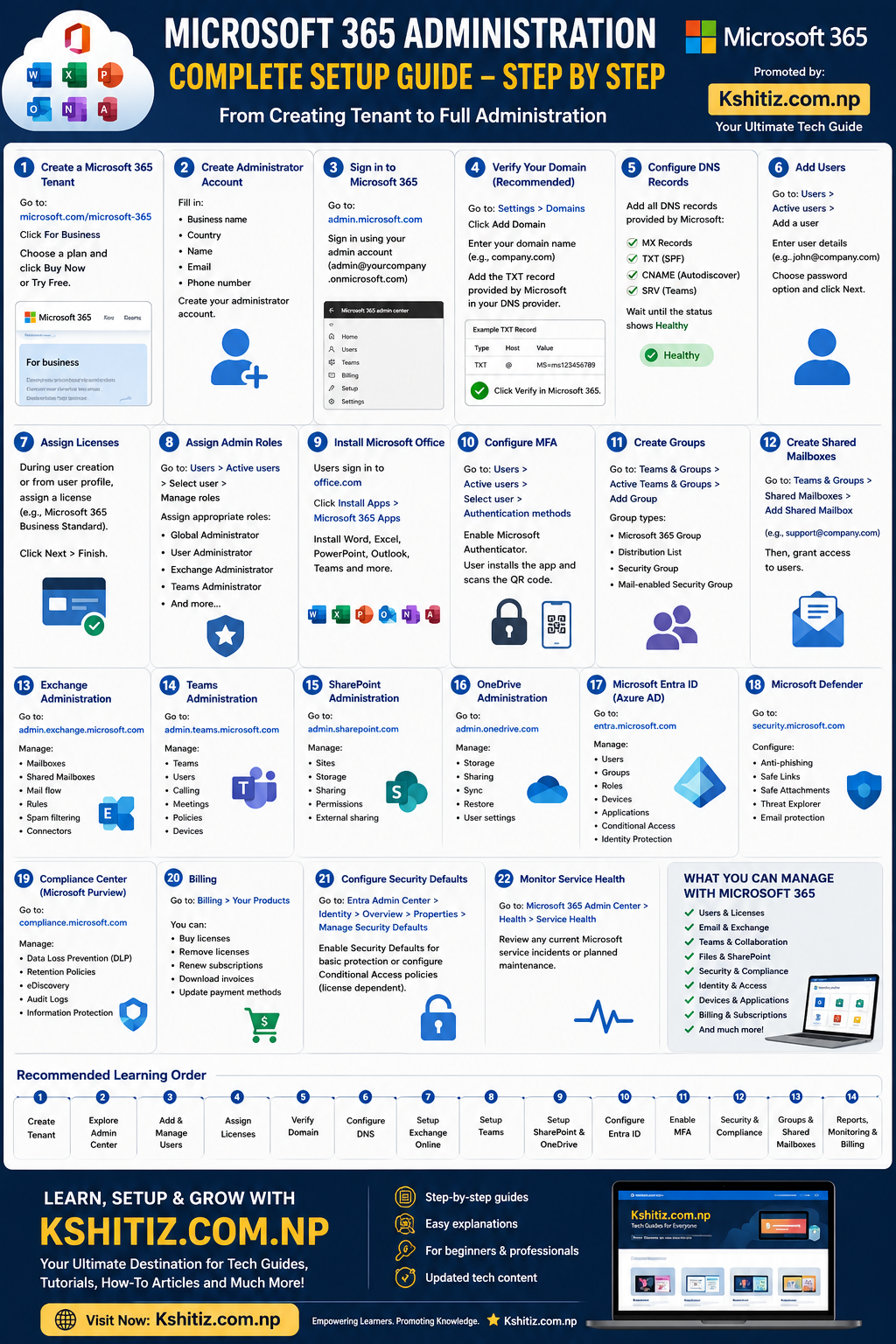
- Step 1: Create a Microsoft 365 Tenant
- Step 2: Sign in to Microsoft 365 Admin Center
- Step 3: Verify Your Domain
- Step 4: Configure DNS
- Step 5: Add Users
- Step 6: Assign Licenses
- Step 7: Assign Administrator Roles
- Step 8: Install Microsoft 365 Apps
- Step 9: Enable Multi-Factor Authentication (MFA)
- Step 10: Create Microsoft 365 Groups
- Step 11: Exchange Online Administration
- Step 12: Microsoft Teams Administration
- Step 13: SharePoint Administration
- Step 14: OneDrive Administration
- Step 15: Microsoft Entra ID
- Step 16: Microsoft Defender
- Step 17: Microsoft Purview Compliance
- Step 18: Billing & Subscription Management
- Microsoft 365 Security Best Practices
- Recommended Learning Roadmap
- Career Opportunities
- Final Thoughts
- 🚀 Learn More with Kshitiz.com.np
Want to become a Microsoft 365 Administrator?
Whether you're an IT student, helpdesk engineer, system administrator, or preparing for the Microsoft MS-102 Certification, this guide will teach you everything from creating your first Microsoft 365 tenant to managing a secure enterprise environment.
By the end of this tutorial, you'll understand the Microsoft 365 Admin Center, user management, licensing, security, collaboration tools, compliance, and much more.
Microsoft 365 is Microsoft's cloud productivity platform that includes:
- Microsoft Outlook
- Word
- Excel
- PowerPoint
- Teams
- OneDrive
- SharePoint
- Exchange Online
- Microsoft Defender
- Microsoft Entra ID
Businesses around the world use Microsoft 365 to manage communication, collaboration, security, and productivity.
A Microsoft 365 Administrator manages:
- Users and Groups
- Email (Exchange Online)
- Microsoft Teams
- SharePoint Sites
- OneDrive Storage
- Licenses
- Security Policies
- Identity Management
- Compliance
- Device Management
- Microsoft Account
- Internet Connection
- Business Email (Optional)
- Domain Name (Recommended)
- Microsoft 365 Business or Enterprise Subscription
Visit Microsoft's official website and choose a Microsoft 365 Business or Enterprise plan.
Enter your:
- Business Name
- Country
- Name
- Email Address
- Phone Number
Create your Global Administrator account.
Example:
[email protected]
After creating your tenant, sign in to the Microsoft 365 Admin Center using your administrator account.
From here you can manage:
- Users
- Licenses
- Security
- Billing
- Teams
- Exchange
- SharePoint
- Reports
Instead of using the default onmicrosoft.com address, connect your own domain.
The verification process involves adding a TXT record to your domain's DNS settings.
Once verified, you can use professional email addresses like:
[email protected]
Add the required DNS records:
- MX Record
- TXT (SPF)
- CNAME
- SRV Record
These records enable email delivery, Outlook auto-configuration, Microsoft Teams, and secure email authentication.
Navigate to:
Users → Active Users → Add User
Create accounts for employees and assign usernames and temporary passwords.
Licenses determine which Microsoft 365 services a user can access.
Popular options include:
- Business Basic
- Business Standard
- Business Premium
- Microsoft 365 E3
- Microsoft 365 E5
Instead of making everyone a Global Administrator, assign only the permissions they need.
Examples:
- Global Administrator
- User Administrator
- Exchange Administrator
- Teams Administrator
- SharePoint Administrator
- Security Administrator
- Billing Administrator
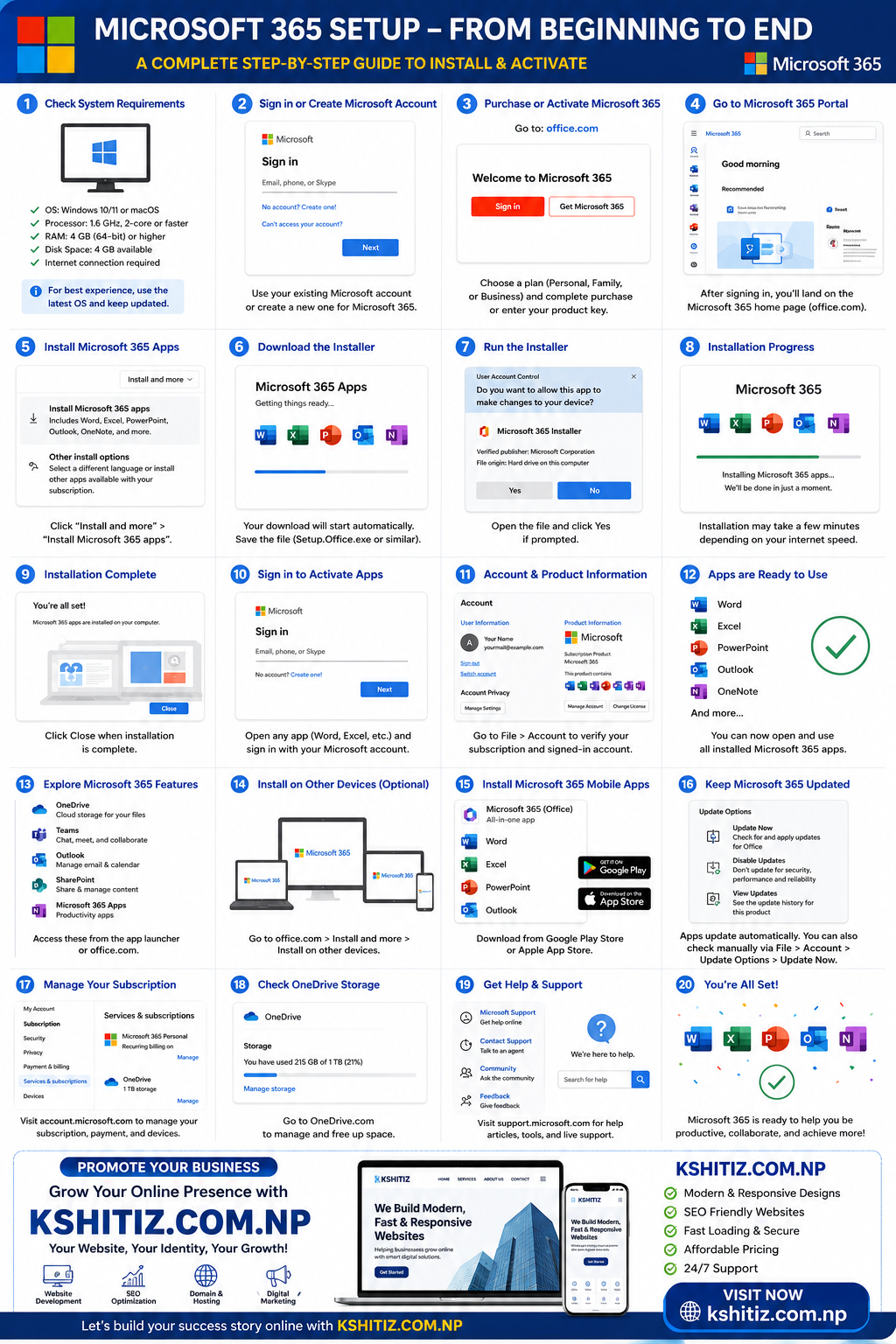
Users can install:
- Word
- Excel
- PowerPoint
- Outlook
- OneNote
- Teams
Applications are available for Windows, macOS, Android, and iOS.
MFA significantly improves account security.
Users can authenticate using:
- Microsoft Authenticator
- SMS
- Phone Call
- Security Key (where supported)
Groups simplify collaboration and resource sharing.
Available group types include:
- Microsoft 365 Groups
- Distribution Lists
- Security Groups
- Mail-enabled Security Groups
Manage:
- Mailboxes
- Shared Mailboxes
- Mail Flow Rules
- Spam Protection
- Email Security
Configure:
- Teams
- Meeting Policies
- Calling
- Voice
- Devices
- Guest Access
Manage:
- Sites
- Permissions
- Storage
- External Sharing
- Content Policies
Control:
- User Storage
- Sync Settings
- Sharing Policies
- Retention
- Restore Options
Manage identities, groups, devices, enterprise applications, and Conditional Access policies.
Protect your organization with:
- Safe Links
- Safe Attachments
- Anti-Phishing
- Threat Explorer
- Email Protection
Implement:
- Data Loss Prevention (DLP)
- Retention Policies
- Audit Logs
- eDiscovery
- Sensitivity Labels
Administrators can:
- Purchase Licenses
- Renew Subscriptions
- Download Invoices
- Manage Payment Methods
- Enable Multi-Factor Authentication for all users.
- Use least-privilege access for administrator roles.
- Keep security policies updated.
- Review sign-in and audit logs regularly.
- Use strong password policies.
- Monitor Microsoft Secure Score and improve recommendations.
- Back up critical business data.
- Create a Tenant
- Explore Admin Center
- Add Users
- Assign Licenses
- Configure Domains
- Configure DNS
- Exchange Online
- Microsoft Teams
- SharePoint
- OneDrive
- Microsoft Entra ID
- Security
- Compliance
- Reporting
- Automation with PowerShell
Microsoft 365 Administration skills are in high demand. Common job roles include:
- Microsoft 365 Administrator
- Office 365 Administrator
- Cloud Administrator
- System Administrator
- IT Support Engineer
- Cloud Support Engineer
- Identity Administrator
- Exchange Administrator
Microsoft 365 Administration is one of the most valuable cloud skills for modern IT professionals. By mastering user management, licensing, identity, security, collaboration, and compliance, you'll be prepared to manage environments ranging from small businesses to large enterprises.
Keep practicing in a test tenant, explore each admin portal, and continue learning advanced topics such as PowerShell automation, Intune device management, Conditional Access, and Zero Trust security.
At Kshitiz.com.np, we publish practical, easy-to-follow tutorials covering Microsoft 365, Azure, Windows Server, networking, cybersecurity, cloud computing, and many other IT topics. Whether you're a beginner or an experienced professional, you'll find step-by-step guides, troubleshooting tips, and career-focused learning resources to help you grow.
Bookmark Kshitiz.com.np and continue your journey from beginner to IT expert!
```